
Switch
Overview
Switches let users adjust settings by toggling between two states. Toggling a switch immediately performs an action.
Other names: Toggle
Behaviors
Focus
The switch label does not get a focus state — just the switch does.
Hover
Hover applies to both the label and the switch.
Disable
Disabled switches cannot be interacted with and have an opacity of 50%. This includes the switch label.
Toggle
Switches toggle off and on. Toggling a switch immediately performs the action. Selecting the label toggles the switch, so does selecting the switch control itself.

Example of switch in off and on positions.
The area inside the switch is known as the switch indicator and is represented by a simple rounded icon on a white background. When the switch is off, the indicator is positioned on the left, and when the switch is on, the indicator moves to the right.
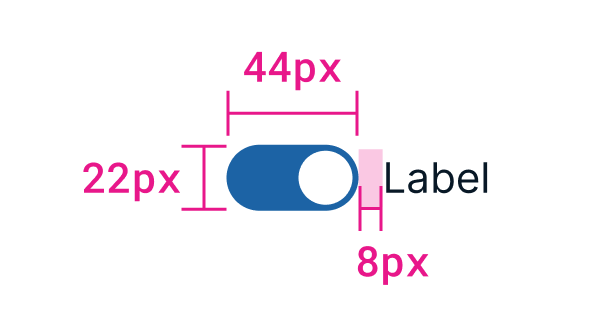
Example of dimensions and spacing for a switch and its label.
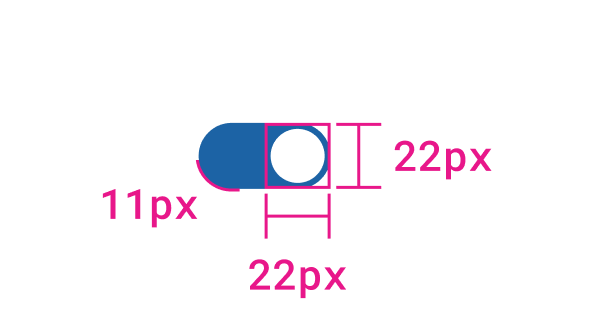
Example of additional dimensions for a switch.
Notification toast
Toggling a switch has an instant effect. In some cases, the effect of a switch will provide obvious feedback to the user, such as showing or hiding content. If the switch’s effect doesn’t have any obvious feedback, a toast should be triggered.
Usage guidelines
General
Switches can enable or disable forms or sections of a page.
Do use switches
- For immediate changes that do not require a form submission
- For selections that require a binary choice
Don't use switches
- For changes that require a form submission or other action to take effect
- For selections that have several options
Content guidelines
Switches have a label to the right that indicates what happens when the switch is on. Try saying the label aloud and add "on/off" to the end. If it doesn't describe the behavior of the switch properly, then the label should be re-written.
Switch labels should be concise and direct. Labels are generally written in sentence case.
Try this
- Email notifications
- Microsoft Entra ID integration
Not this
- Automatically receive email notifications
- Would you like to enable the integration?
Switches or checkboxes
In most cases, checkboxes should be used instead of switches. Switches should only be used for actions that immediately cause something to happen.
Related
Referenced in this section:
Updated 8 days ago